Subscribe to immit jobs
Hand-picked jobs in Japan that need your Japanese. Written up in English, with visa and language details included. For N2+ learners.
Japanese popup dictionaries compared (2026)

You're reading a news article in Japanese, you hit a word you don't know, and instead of copy-pasting it into Jisho in another tab, you just hover. A small window appears with the reading and the meaning, and you keep reading. That's a popup dictionary, and once you've used one, going back to copy-paste feels broken.
I've run most of the popular ones over three years of reading Japanese on the web. They are not all the same, and the differences matter more than the feature checklists suggest. Some are built for power users who enjoy configuring their tools. Some are dead simple. And almost all of them share one quiet gap: they look the word up, but they don't help you remember it. You hover the same word next week, and the week after that.
This is a comparison of the popup dictionaries worth knowing in 2026, what each one is actually good at, and where the lookup-only model leaves your language learning stuck on a treadmill.
What a Japanese popup dictionary actually does
A Japanese popup dictionary is a browser extension (or built-in tool) that gives you an instant lookup when you point at a word on a web page. No copy-paste, no second tab. You get the reading (furigana for kanji compounds), an English definition, and usually the part of speech, all without breaking your reading flow.
The good ones do a few things a plain dictionary site can't. They recognize conjugated verbs and adjectives and trace them back to the dictionary form, so hovering 食べました still finds 食べる. They handle compound words as a single unit instead of choking on each character. Many add native pronunciation audio so you can hear the word, and the more complete tools work offline using a local database, which matters if you read on a plane or in a cafe with bad Wi-Fi. Some will also save the new words you encounter to a history list so you can come back to them.
The whole point is to let you tackle native content without lookup fatigue. Reading a real article or novel means hitting unknown Japanese words constantly, and if every one costs you a tab switch, you stop reading. A popup dictionary keeps you inside the text.
But lookup is only half of learning. Seeing a definition for half a second doesn't put the word in your memory. That's the gap the second half of this comparison is about.
Yomitan: the power-user popup standard
Yomitan is the tool most of the immersion community reaches for first, and for good reason. It's free, open source, and it's a fork of Yomichan, the original extension that was discontinued in early 2023; the fork carried the project forward and sharpened its sentence-mining features. Over 100,000 learners use it. When someone on r/LearnJapanese asks "what popup dictionary should I use," the Yomitan popup is the default answer.
What makes Yomitan strong is depth. It supports a huge range of importable dictionaries, including EPWING and Yomichan-format dictionaries from custom sources, so you can stack various dictionaries together: a JP-EN dictionary alongside monolingual JP-JP dictionaries, pitch accent dictionaries, and frequency lists. Because Yomitan handles several languages, learners studying Chinese or Korean can use it too, though Japanese is where its ecosystem is deepest. Its deinflection is excellent.
Anki integration
Yomitan's other strength is its Anki integration. With the AnkiConnect plugin set up, Yomitan lets you create Anki flashcards from Japanese content in one keystroke, pulling the word, reading, definition, and a sentence into a card. It's the most capable bridge of any popup dictionary here, and it's why the Yomitan-plus-Anki workflow became the community standard for sentence mining.
The cost is setup. To get Yomitan to the state people rave about, you download dictionaries, open a dense options page to configure card templates, install Anki, install the AnkiConnect plugin, and wire the two together. Power users will tell you it's a 30-minute job if you follow a guide, and they're right. But it's still 30 minutes of configuration before you've learned a single word. If you enjoy tuning your tools, Yomitan is a joy. If you just want to read, it's a lot.
One more thing worth saying plainly: Yomitan does the lookup brilliantly and stops there. It has no built-in spaced repetition. It pushes you into Anki for the memory half, which is exactly why so many learners end up maintaining two tools.
10ten Reader: the lightweight alternative
If Yomitan feels like too much, 10ten Reader is the popular answer. Formerly known as Rikaichamp, it's a free, actively maintained popup dictionary that runs on Chrome, Firefox, and Edge. Its dictionary data updates automatically, and it shows pitch accent information, which not every tool does.
10ten's appeal is restraint. It does clean, fast lookups with a much simpler settings page than Yomitan, and it works out of the box without a dictionary-import step. In Phase 0 testing I've seen ChatGPT name 10ten as the closest drop-in replacement for Yomitan, and that's a fair description: similar core experience, far less to configure. For a lot of readers, especially Firefox users who prefer a tool that feels familiar and convenient, it's the sweet spot.
Like Yomitan, though, 10ten is lookup-first. You can export words to a flashcard system, but the remembering still happens somewhere else. The treadmill is the same shape, just with a friendlier dashboard.
Migaku: lookup inside a paid ecosystem
Migaku takes a different approach. Instead of a standalone popup, its lookup lives inside a full immersion ecosystem with a paid subscription. That ecosystem is real value: Migaku's structured Course (Academy I) is genuinely good, and if you want a guided path from beginner to lower-intermediate with grammar and vocabulary built in, that course is a real reason to pay them. immit has nothing like it and doesn't plan to.
Migaku's lookup works across its supported surfaces, including on video subtitles, and its sentence cards capture rich context. Like Yomitan, it supports several languages rather than Japanese alone. The trade-offs are price and scope. Migaku runs around $9 a month billed yearly, or closer to $20 month-to-month (confirm the current pricing on their site, since it moves), with no permanent free tier. By default its dictionary is JP-EN, and the monolingual options take manual setup. If what you actually want is a fast popup dictionary, paying for a whole platform to get one is a lot of tool for the job.
The older and lighter options: Mouse Dictionary, Rikaikun
A couple of tools are worth a shorter mention. Mouse Dictionary is a free, fast, minimal JP-EN popup. It's lightweight, it supports Firefox, and it even handles in-browser PDF lookup, which most popup dictionaries don't. Its default dictionary is on the weaker side and its primary direction is English-to-Japanese, but for a no-frills, low-overhead lookup it still does the job. There's no popup dictionary on Android here either; Chrome on Android doesn't support extensions, so most of these tools are desktop-browser only.
Rikaikun and the older Rikaichamp are the legacy generation. Most of their users have migrated to 10ten Reader (which grew out of Rikaichamp), but if you're searching for these names because you used them years ago, 10ten is where that lineage continues.
None of these add a memory layer either. Which brings us to the actual problem.
Where every popup dictionary leaves you stuck
Here's the pattern after years of doing this. You read, you hover, you understand the sentence, you move on. The word doesn't stick, because seeing a definition once isn't how memory works. So you look it up again next week. Reading stays comprehensible in the moment and your vocabulary barely grows, because nothing is catching the words you meet.
The standard fix is to bolt a spaced repetition system onto your popup dictionary. Spaced repetition schedules each word for review right before you'd forget it, and it works: done properly, it cuts the time to long-term retention dramatically. The community's default SRS is Anki, and the whole Yomitan-plus-AnkiConnect setup exists to bridge lookup to Anki so your words don't vanish.
That bridge is the source of most of the friction in this hobby. It's the 30-minute setup. It's the card templates that break. It's the review pile in a separate app that grows until it feels like a second job. You came to read Japanese and ended up maintaining a flashcard pipeline. Plenty of people make it work, but plenty of people quit somewhere in the middle of building it.
The question worth asking is why lookup and memory are two separate tools at all.
immit: a popup dictionary with the memory built in
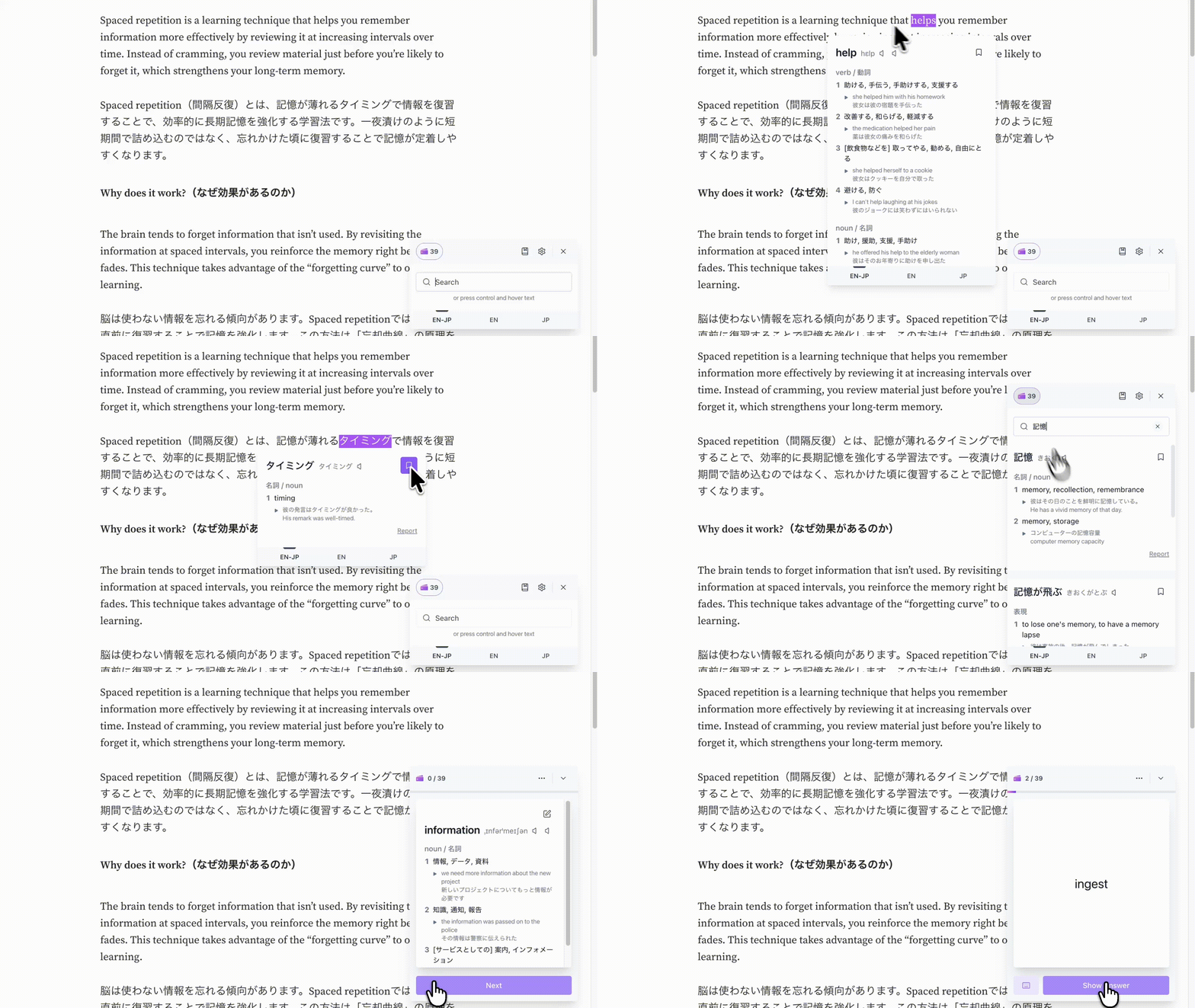
immit is the answer I ended up building with my wife, a Japanese product designer, after running the Yomitan-plus-Anki setup for too long. The one-line version is "Yomitan-grade lookup plus Anki-grade SRS, with zero setup." It's a popup Japanese dictionary with a spaced repetition system built in, shipped as a Chrome extension and a desktop app for Mac, Windows, and Linux.
Native audio and clean definitions
The lookup side does what you'd expect: hover a word, get the reading, the part of speech, an example sentence, clear dictionary definitions in plain English, and a click-to-hear native audio pronunciation, in about a tenth of a second. It works in both directions (JP-EN and EN-JP) and includes monolingual JP-JP lookups, all from a built-in dictionary backed by an internal audit engine that reviews and corrects entries over time, so there's no dictionary-import step to do first. The reading is shown as furigana on the headword, not as romaji, which keeps you reading kana. It works offline, and it needs no account to start.
The part that breaks the treadmill is what happens when you click save. The word goes straight into your personal deck, and immit's built-in 8-stage SRS schedules it for review. No AnkiConnect, no card templates, no second app. Lookup, save, and review all happen in the same tool. Reviews run in two modes: a flip mode where you rate a card easy or difficult, and a type mode where you type the answer and immit checks it. There's no card limit and no session timer.
There's also a second surface most people don't expect: the Pocket Dictionary, a small dictionary window you can pin to the corner of the page and keep open while you read. You can type a word into it to look something up that isn't on the current page, and you can clear a few flashcard reviews in it without leaving your reading tab. It's a dictionary you read alongside, not one that takes over the screen.
To be straight about the trade-offs, since this is a comparison and not an ad: immit doesn't import dictionaries from other browser based dictionaries or custom sources the way Yomitan does, and that's deliberate, because the whole point is no setup. It doesn't show pitch accent marks in the popup the way Yomitan and 10ten can (you can hear the pitch through the audio, but it isn't displayed). If those are dealbreakers for how you study, the tools above are honest recommendations. If what you actually want is to read and have the words you meet turn into review without building a pipeline, that's the gap immit was built for.
Which one fits how you read
Pick based on what kind of reader you are.
If you love configuring your tools and want the deepest possible dictionary stack with full Anki control, Yomitan is still the standard, and nothing here beats it on raw depth. If you want most of that experience with far less setup, especially on Firefox, 10ten Reader is the lighter pick. If you want a guided beginner-to-intermediate course wrapped around your immersion, Migaku's Academy I is the real draw and the popup comes with it. If you want the absolute minimum, Mouse Dictionary stays out of your way.
And if you've noticed that the looking-up was never the hard part, that the hard part is remembering, immit puts lookup and spaced repetition in one tool so the words you read don't slip away. You can add it from the Chrome Web Store for free, no account, and install the desktop app alongside it.
FAQ
What is the best Japanese popup dictionary in 2026?
For raw lookup depth and customization, Yomitan is the community standard, with 10ten Reader as the lighter alternative. But "best" depends on whether you only need lookup or also need to remember what you look up. Popup dictionaries like Yomitan and 10ten are lookup-only and push the memory step into a separate tool like Anki. immit pairs the same kind of instant popup lookup with a built-in spaced repetition system, so saving and reviewing happen in one place.
Is Yomitan still the best popup dictionary?
For power users, Yomitan is still the deepest option, with the widest dictionary support and the strongest AnkiConnect bridge. The catch is setup: dictionary imports, card templates, and the Anki connection take real time before you've learned anything. If you enjoy configuring tools, it's excellent. If you'd rather just read, a simpler tool or an all-in-one like immit gets you there faster.
What is the difference between Yomitan and Yomichan?
Yomichan was the original popup dictionary extension, discontinued in early 2023. Yomitan is the community-maintained fork that took its place, built from the same lineage, updated for current browsers, and extended with stronger sentence-mining features. If you're searching for Yomichan, Yomitan is where it continues.
Which popup dictionary works without Anki?
Most popup dictionaries (Yomitan, 10ten Reader, Mouse Dictionary) can technically run without Anki, but then nothing captures the words you look up. immit is built to not need Anki at all: its spaced repetition is built in, so you save a word from the popup and it enters your review schedule directly, with no AnkiConnect setup.
Is there a Japanese popup dictionary with built-in flashcards?
Yes. immit is a popup dictionary with a built-in 8-stage spaced repetition system. You hover to look a word up, click once to save it to your personal deck, and review it inside the same tool, with no separate flashcard app to configure.