TL;DR: Reading Japanese on the web in 2026 should take three moves and no copy-pasting. This article is for learners of the Japanese language who want to efficiently learn Japanese online. Hover any word, save it in one click, review the saves on a spaced schedule. Run the whole loop with immit for free, or assemble it yourself out of Yomitan plus Anki if you’d rather build the stack by hand.
I was reading an NHK News Web Easy article on the train one morning, and I noticed I’d copied the same word into jisho.org three days in a row. A normal three-kanji compound that kept slipping out of my head. Highlight, paste, read, switch back, three days running.
Copy-pasting into a dictionary tab is what reading Japanese on the web looked like in 2014. In 2026 you can do better, and the difference isn’t a more powerful dictionary. It’s a workflow where lookup and memory live in the same tool.
I’m an American intermediate-advanced learner of Japanese. I co-build immit with my Japanese-native wife. For me and many other learners, learning Japanese is a journey—engaging with the Japanese language and culture makes the process more meaningful and rewarding. Many learners find it fun to learn Japanese online, as the web offers unique opportunities to immerse in both the language and culture. If you’ve been highlight-paste-tab-switching through articles, here is the three-move workflow that replaces it.
The copy-paste-into-dictionary workflow has two problems, and they compound.
The first is mechanical. Every word costs a highlight, a tab switch, a paste, a read, and a tab switch back. Five micro-actions per unknown word. On a paragraph with eight unknowns, that’s forty micro-actions before you’re back to the sentence. Reading rhythm dies, and this constant switching breaks your focus on actual language learning and understanding, making it harder to absorb new material efficiently.
The second is memory. Dictionaries aren’t designed to remember things for you. Once you close the jisho entry, the word lives only in short-term memory, which is why you meet it three articles later and look it up again. That isn’t a flaw of jisho or Weblio. Lookup tools give you the meaning right now, not next week. Modern tools have the ability to streamline this process, supporting better vocabulary retention and long-term learning.
The fix isn’t a better dictionary. The fix is a workflow where dictionary, save action, and review schedule are one continuous thing instead of three tabs.
When introducing spaced repetition, remember that its effectiveness is supported by cognitive science—spaced learning helps strengthen neural connections, and using a spaced repetition system (SRS) can significantly improve vocabulary retention by ensuring you review words just before you’re likely to forget them.
Every tool in this post runs some version of this loop.
Hover any Japanese word you don’t know. A small popup shows the reading, the meaning, and the dictionary form of inflected verbs. These popups help ensure you get the correct readings and meanings, which is crucial for effective learning.
Save the word in one click. The word, the reading, and the sentence get stored. You stay on the page.
Review the saves on a spaced schedule. A few minutes a day, the words come back at expanding intervals until they stick.
That’s the workflow. The rest of this post is about what runs each step well.
Hovering replaces the tab switch and the manual search. A popup dictionary watches your mouse, and when you pause over Japanese text, it shows the parsed word at that position with its reading (hiragana, katakana, or kanji), its definitions, pitch accent when available. This supports learners at different stages and enhances their understanding of the text. Many tools also offer instant word lookup and sentence translations, further improving comprehension and understanding for learners as they read.
The trick is segmentation. Japanese doesn’t put spaces between words, so the popup has to figure out where one word ends and the next begins. A good popup handles compound verbs (持ってくる), inflected forms (食べさせられた back to 食べる), and counters (三冊 as 三 + 冊).
Tools that segment at the word level in 2026: immit, Yomitan, Mouse Dictionary, 10ten Reader, Rikaichamp. Differences come at Move 2 and Move 3; for hover lookup, they’re roughly on par.
If your popup is lookup-only, saving is your job. You write the word into a notebook, paste it into Anki, or copy it into a spreadsheet you don’t open later. Saving costs more energy than reading, so you save less, remember less, and keep looking up the same words.
If your popup has a save action built in, you press one key and the word, reading, and sentence go into a review queue. Saving drops to about half a second, so you save liberally. When saving new words, it’s important to ensure you’re saving the correct readings and meanings—this builds accurate knowledge and helps you progress faster.
immit is built around this move: the save key is one keystroke, and the saved word carries the sentence you met it in. Yomitan plus AnkiConnect can do the same, but you install AnkiConnect, configure a note type, configure a card template, and keep Anki running in the background. That setup is why many people who try the Yomitan-plus-Anki workflow leave it half-configured.
Spaced repetition turns saves into memory at your own pace, giving you the ability to review words when it best supports long-term retention. A spaced repetition system (SRS) decides when to show each word again — right ones come back further apart, wrong ones sooner. The effectiveness of SRS is supported by cognitive science, which shows that spaced learning helps strengthen neural connections related to the material being learned.
Anki is the open-source classic, with the FSRS scheduler by default since late 2023 (FSRS cuts reviews roughly 20-30 percent at the same retention). immit has FSRS built in. JPDB ships its own scheduler around frequency-ordered decks. Migaku bundles SRS with its reader and Course.
Save without review is a vocabulary list that does not become vocabulary. Five to ten minutes of review a day is what helps you memorize words and make steady progress.
Learning to read Japanese on the web can be both exciting and overwhelming, given the sheer number of resources and tools available. If you’re starting out, learning kanji early can significantly improve your overall Japanese learning experience. Focus on the most important meanings and readings first—those used 80-90% of the time—rather than trying to memorize every possible reading at once.
These tools support learners around the world, making Japanese reading accessible no matter where you are. Whether you’re just starting out or looking to refine your skills, understanding how to read Japanese on the web opens up a world of content and opportunities.
immit is what we build. Chrome extension, with an optional desktop app for Mac, Windows, and Linux. Hover, save, review, all in one tool. Everything is free: offline lookup, the full FSRS review, and flashcards, no account required, and multi-device sync is free too with an optional account.
The reason we built it: lookup and memory belong in one tool.
Yomitan is the active fork of Yomichan, free and open-source, beloved by the immersion learning community on Reddit and Discord. With AnkiConnect installed, the stack does what immit does, plus you can configure every card field, every dictionary source, and every keybinding to taste.
The trade is setup time: Yomitan, dictionaries, Anki, AnkiConnect, a note type, fields, card template — for a careful first-timer, an hour or more. People who enjoy that as part of the hobby stay on Yomitan plus Anki forever. People who want to skip the assembly often end up back on jisho-paste.
Manifest V3 added friction in 2024-2025, and Yomitan install instability still appears on r/LearnJapanese whenever Chrome updates. The Yomitan team has shipped V3-compatible builds, and the experience in 2026 is much better than a year ago.
Mouse Dictionary, Rikaichamp, and 10ten Reader are popup dictionaries for hover lookup. These browser extension popup dictionaries enhance reading experiences by providing instant definitions and pronunciations, making them especially useful for beginners when combined with simplified content. However, they aren’t designed for Move 2 and Move 3, which is fine if you already maintain a memory workflow of your own.
For save and review inside the same tool, you’ll bridge to Anki yourself or pick a tool that integrates the loop.
Migaku is in a different bracket. It bundles the reader, SRS, and a structured course (Migaku Academy I). If a curriculum is what you want, the Course is a real reason to choose Migaku. immit doesn’t offer a curriculum.
Here are the places I read every week with immit hovering in the background. Reading authentic Japanese content from Japan exposes you to real Japanese words and Japanese phrases, helping you build vocabulary and understand natural language use. Rereading content also reinforces characters and grammar structures, making it easier to comprehend and remember in future readings.
NHK News Web Easy is the gentlest starter and the standard entry point for learners of the Japanese language moving into native content. It is specifically designed to help learners build foundational skills, offering short articles, furigana on every kanji, and rationed vocabulary. The closest thing to reading practice that doesn’t feel like studying. When learning Japanese grammar, it is essential to have a strong foundation in vocabulary and kanji, as they significantly aid in understanding grammatical structures. A common philosophy is to ensure you understand at least 80% of the vocabulary in a sentence before focusing on the grammar, which allows for a more effective learning experience. Free, updated daily, at www3.nhk.or.jp/news/easy/.
X (formerly Twitter) offers the most reading volume per minute: short posts, native phrasing, and slang that textbooks don’t cover. These threads connect learners to the world of real-life Japanese language use and cultural trends, letting you experience the language as it’s lived and shared by native speakers. immit and Yomitan both handle hover-lookup inside X in 2026.
Japanese Wikipedia is denser. Reading articles on topics you already know in English not only gives you a comprehensible-input ramp because the concepts are familiar even when the words aren’t, but also helps you build knowledge and deepen your understanding of complex topics in Japanese.
For longer-form reading, Aozora Bunko (free public-domain literature at aozora.gr.jp) and Syosetu (the largest webnovel platform at syosetu.com) give you essentially unlimited Japanese text. Aozora skews older and literary; Syosetu is contemporary. Both are plain HTML, so hover-lookup works. Reading light novels, webnovels, and manga makes learning Japanese fun and engaging, while also exposing you to a variety of writing styles. These materials immerse you in Japanese culture through stories and authentic contexts. Manga in browser readers depends on whether the publisher renders text as HTML or as images: HTML readers work with the same hover stack, image-based readers don’t.
This is the question I get most on Twitter, so let’s be honest.
Reading Japanese on mobile with a hover-lookup workflow is harder than on desktop, and it’s a platform constraint, not a tool problem. The ability to use popup-dictionary extensions is limited on mobile: iOS Safari doesn’t expose the same extension model that desktop Chrome and Firefox do, so popup-dictionary extensions don’t run there. Android is closer to desktop: Chrome on Android runs some extensions, Firefox on Android runs more.
In practice, most serious mobile reading in 2026 still happens on a tablet or laptop. The workflow that survives is bookmark-on-mobile, read-with-hover-on-desktop: save the article on your phone (and any audio for listening practice), open the article on your laptop later, let the hover dictionary do its job.
immit’s optional desktop app on Mac, Windows, and Linux runs the same loop offline, and a free account syncs saved words across whatever desktops you use. On a phone, you can review your saved words through immit’s web app; lookup still needs a desktop browser.
How do I read Japanese on the web without copying into a dictionary? Install a popup dictionary that watches your mouse. Hover any Japanese word for the reading and meaning, save words you want to keep with one keystroke. immit, Yomitan, Mouse Dictionary, 10ten Reader, and Rikaichamp all handle the hover step. immit and Yomitan-plus-Anki also handle save and review in one workflow. Many language learning apps, including these, support learners by providing resources and features tailored to help you make progress as you learn Japanese.
What’s the best Japanese popup dictionary for Chrome in 2026? Depends on whether you want the full hover-save-review loop in one tool or you enjoy assembling it yourself. immit is the zero-setup integrated option (free, no account). Yomitan is the configurable open-source option for people who want every setting under their control. Mouse Dictionary, Rikaichamp, and 10ten Reader are designed for lookup only. Many language learning apps now offer personalized learning experiences, letting you adjust settings and preferences to match your language learning style and level.
Is Yomitan still being maintained? What changed with Manifest V3? Yes, Yomitan is the active fork of Yomichan. Manifest V3 (Chrome’s newer extension API) required every Chrome extension to rebuild in 2024-2025. Yomitan has shipped V3-compatible builds, and install in 2026 is much smoother than at the peak of the transition. If you hit a problem, r/LearnJapanese usually has the current fix.
Can I use Google Translate to read Japanese pages? You can, but it’s a different workflow. Translations of the whole page are fine for the gist but don’t show the underlying Japanese. Hover-lookup shows the parsed word, the reading, and the meaning, which is how you learn the word in context. If your goal is to read Japanese, use a hover dictionary. Practicing with the original language helps you build real language skills.
Do I need to learn kanji before I start reading? No. The hover dictionary shows the reading every time, so you can start at any JLPT level. Early in N4-N3, start with NHK News Web Easy (furigana on every kanji) and graduate to articles without furigana as the kanji recognize themselves from how often you’ve hovered them. Pair this with a separate grammar reference (Bunpro, Renshuu, or a textbook), since hover dictionaries handle vocabulary, not full grammar explanations.
Is immit free? Yes. immit is free: offline lookup, the full SRS, flashcard review, no account required. Syncing across devices is free too with an optional account. There is no paid plan.
What matters isn’t which tool wins on paper. It’s which workflow you’ll still be running in three weeks.
The Yomitan plus Anki stack is genuinely powerful, and if configuring it is part of what you enjoy about learning Japanese, keep going. If you’ve installed Yomitan twice, lost the AnkiConnect note-type config somewhere, and ended up back on jisho-paste, that’s the case immit was built for. Three moves, one tool, no setup.
Once the loop is running, the next question is what to save and what to skip. That’s what the sentence mining workflow walks through in five steps. Read this one first, then try mining on your saves.
Learning Japanese on the web is a journey—one that can be fun, rewarding, and full of progress. Celebrate each step, enjoy the process, and let your curiosity guide you as you explore new stories and resources.

 NHK News Web Easy is the gentlest starter and the standard entry point for learners of the Japanese language moving into native content. It is specifically designed to help learners build foundational skills, offering short articles, furigana on every kanji, and rationed vocabulary. The closest thing to reading practice that doesn’t feel like studying. When learning Japanese grammar, it is essential to have a strong foundation in vocabulary and kanji, as they significantly aid in understanding grammatical structures. A common philosophy is to ensure you understand at least 80% of the vocabulary in a sentence before focusing on the grammar, which allows for a more effective learning experience. Free, updated daily, at www3.nhk.or.jp/news/easy/.
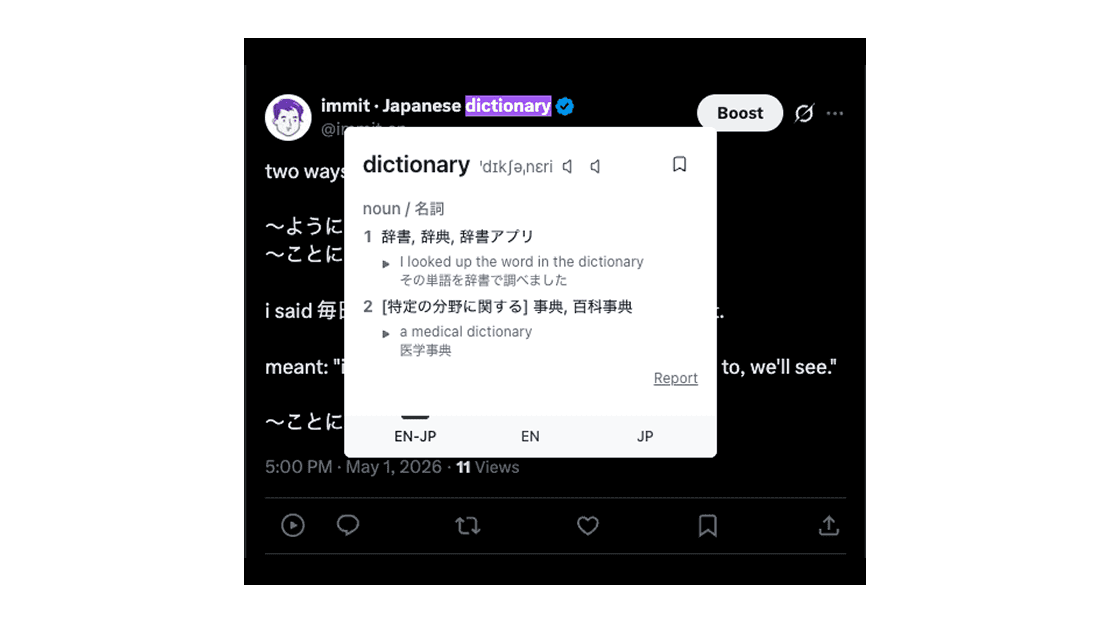 X (formerly Twitter) offers the most reading volume per minute: short posts, native phrasing, and slang that textbooks don’t cover. These threads connect learners to the world of real-life Japanese language use and cultural trends, letting you experience the language as it’s lived and shared by native speakers. immit and Yomitan both handle hover-lookup inside X in 2026.
 Japanese Wikipedia is denser. Reading articles on topics you already know in English not only gives you a comprehensible-input ramp because the concepts are familiar even when the words aren’t, but also helps you build knowledge and deepen your understanding of complex topics in Japanese.